
HTML+CSS+javascript
Set Up
Detail
WebStorm
一款JavaScript 开发工具。被广大中国JS开发者誉为“Web前端开发神器”、“最强大的HTML5编辑器”、“最智能的JavaScript IDE”等。与IntelliJ IDEA同源,继承了IntelliJ IDEA强大的JS部分的功能。
HTML
一种超文本标记语言,标准通用标记语言下的一个应用。
1
2
3
4
5
6
7
8
9
10
11
12
13
14
15
16
17
18
19
20
21
22
23
24
25
26
27
28
29
30
31
32
33
34
35
36
37
38
39
40
41
42
43
44
45
46
47
48
49
50
51
52
53
54
55
56
57
58
59
60
61
62
63
64
65
66
67
68
69
70
71
72
73
74
75
76
77
78
79
80
81
82
83
84
85
86
87
88
89
90
91
92
93
94
95
96
| <!DOCTYPE html>
<html lang="en">
<head>
<meta charset="UTF-8">
<title>Title</title>
<link href="bootstrap-3.3.5-dist/css/bootstrap.min.css " rel="stylesheet">
<link href="styles.css" rel="stylesheet">
<link href="js.js" rel="stylesheet">
<script language="JavaScript" src="js.js"></script>
</head>
<body>
<div class="top">
<img src="logo.png">
</div>
<div class="mid">
<div class="midin">
<form class="login">
<div class="title"><b style="display: block;" id="login_txt">用户登录</b>
<div class="alert alert-danger" id="alert_warn" >
<img src="error.png" alt="warn">
<b id="warn_txt"></b>
</div>
<div class="alert alert-success" id="alert_success">
<b> 登录成功</b>
</div>
</div>
<div class="input-group">
<span class="input-group-addon" >
<span class="glyphicon glyphicon-user">
</span>
</span>
<input type="text" class="form-control" value=" 账号(手机号)" id="username"
onFocus="if(value==defaultValue){value='';this.style.color='#000'}"
onBlur="if(!value){value=defaultValue;this.style.color='#c2a599';}"
style="color:#999999; font-family: 'Microsoft YaHei UI'; width: 260px" maxlength="11"
onkeyup="this.value=this.value.replace(/\D/g,'')"
onafterpaste="this.value=this.value.replace(/\D/g,'')">
</div>
<div class="input-group">
<span class="input-group-addon">
<span class="glyphicon glyphicon-lock">
</span>
</span>
<input type="text" class="form-control" value=" 密码" name="input_psw" oninput="pswInputting()" id="password"
onFocus="if(value==defaultValue){value='';this.style.color='#000'}"
onBlur="if(!value){value=defaultValue;this.style.color='#c2a599';}"
style="color:#999999; font-family: 'Microsoft YaHei UI'; width: 260px" maxlength="32">
</div>
<button class="btn" type="button" onclick="setTimeout($tip(), 200);" id="btn_submit">登 录</button>
<a href="#" id="forget">忘记密码</a>
<a href="#" id="reg">免费注册</a>
</form>
</div>
</div>
<div class="bottom">
<hr>
<div class="b1">
<a href="#">阿里巴巴集团</a> |
<a href="#">阿里巴巴国际站</a> |
<a href="#">阿里巴巴中国站</a> |
<a href="#">全球速卖通</a> |
<a href="#">淘宝网</a> |
<a href="#">天猫</a> |
<a href="#">聚划算</a> |
<a href="#">一陶</a> |
<a href="#">阿里妈妈</a> |
<a href="#">淘宝旅行</a> |
<a href="#">虾米</a> |
<a href="#">阿里云计算</a> |
<a href="#">云OS</a> |
<a href="#">万网</a> |
<a href="#">支付宝</a> |
<a href="#">来往</a> |
<hr>
</div>
<div class="b2">
<div class="b21">
<a href="#">关于淘宝</a>
<a href="#">合作伙伴</a>
<a href="#">营销中心</a>
<a href="#">廉政举报</a>
<a href="#">联系客服</a>
<a href="#">开放平台</a>
<a href="#">诚征英才</a>
<a href="#">联系我们</a>
<a href="#">网站地图</a>
<a href="#">法律声明</a>
@2016 Taobao.com 版权所有
</div>
网络文化经营许可证; 网文网[2010]040号 | <span id="zengzhi">增值电信业务经营许可证:浙B2-20080224-1 |
信息网络传播许可证:1109364</span>
</div>
</div>
</body>
</html>
|
CSS
一种用来表现HTML(标准通用标记语言的一个应用)或XML(标准通用标记语言的一个子集)等文件样式的计算机语言。
1
2
3
4
5
6
7
8
9
10
11
12
13
14
15
16
17
18
19
20
21
22
23
24
25
26
27
28
29
30
31
32
33
34
35
36
37
38
39
40
41
42
43
44
45
46
47
48
49
50
51
52
53
54
55
56
57
58
59
60
61
62
63
64
65
66
67
68
69
70
71
72
73
74
75
76
77
78
79
80
81
82
83
84
85
86
87
88
89
90
91
92
93
94
95
96
97
98
99
100
101
102
103
104
105
106
107
108
109
110
111
| .body{
margin: 0;
padding: 0;
}
.top{
width: 1200px;
height: 80px;
margin:0 auto 0 auto;
padding:15px 0 15px 0;
}
.mid{
height: 600px;
background: url("login-bg.jpg") no-repeat center;
}
.blank{
height: 70px;
}
.bottom{
width: 1200px;
margin: 0 auto 0 auto;
}
.b1{
height: 44px;
}
.b1 a{
color: #666;
}
.b2{
height: 60px;
}
.b21{
height: 30px;
}
.b21 a{
color:#555555
}
#zengzhi{
color: #333;
}
.login{
float: right;
width: 350px;
height: 350px;
background-color: #f1f6ff;
margin-top: 100px;
border-radius: 5px;
}
.midin{
width: 1200px;
margin: 0 auto 0 auto;
}
.title{
margin: 35px 20px 35px 20px;
}
.input-group{
margin: 0 20px 30px 20px;
height: 40px;
}
.input-group input{
height: 40px;
}
.btn{
width: 310px;
background-color: #f84e4e;
margin:0 20px 30px 20px;
font-family:"黑体";
color:white;
}
.btn:hover{
background-color: #f89999;
color:white;
}
#forget{
float: left;
margin-left: 20px;
color:#555555;
}
#reg{
float: right;
margin-right: 20px;
color:#555555;
}
#alert_warn{
display: none;
hegiht: 27px;
margin-right: 11px;
padding: 0px;
}
#alert_warn img{
width: 22px;
hegiht: 22px;
color:white;
}
#alert_warn b{
color: #ff2624;
font-size: smaller;
font-weight: 700;
font-size: 15px;
}
#alert_success{
display: none;
height: 27px;
margin-right: 11px;
padding: 0px;
}
#alert_success b{
color: #1d8031;
font-size: smaller;
font-weight: 700;
font-size: 15px;
}
|
javascript
一种直译式脚本语言,是一种动态类型、弱类型、基于原型的语言,内置支持类型。它的解释器被称为JavaScript引擎,为浏览器的一部分,广泛用于客户端的脚本语言,最早是在HTML(标准通用标记语言下的一个应用)网页上使用,用来给HTML网页增加动态功能。
1
2
3
4
5
6
7
8
9
10
11
12
13
14
15
16
17
18
19
20
21
22
23
24
25
26
27
28
29
30
31
32
33
34
35
36
37
38
39
40
41
42
43
44
45
46
47
48
49
50
51
52
53
54
55
56
57
58
59
60
61
62
63
64
65
66
67
68
69
70
71
72
73
74
75
76
77
78
79
80
| function pswInputting() {
var psw_input = document.getElementsByName("input_psw").item(0);
var str = psw_input.value;
if (str.length != 0) {
if (str == " 密码") {
return;
}
psw_input.type = "password";
} else {
psw_input.type = "text";
}
}
function $tip(){
var username = document.getElementById("username");
var password = document.getElementsByName("input_psw").item(0);
var reg = /^0?1[3|4|5|8][0-9]\d{8}$/;
var login_txt = document.getElementById("login_txt");
var warn_txt = document.getElementById("warn_txt");
var block = document.getElementById("alert_warn");
var block_success = document.getElementById("alert_success");
var btn = document.getElementById("btn_submit");
btn.style.color = "#ffffff";
btn.blur();
var flag;
setTimeout("", 200);
if (username.value == " 账号(手机号)" || username.value == "") {
warn_txt.innerHTML = "<strong>账户不能为空!</strong>";
flag = 1;
} else if (!reg.test(username.value)) {
warn_txt.innerHTML = "<strong>账户为11位有效手机号!</strong>";
flag = 2;
}else if (password.value == " 密码" || password.value == "") {
warn_txt.innerHTML = "<strong>密码不能为空!</strong>";
flag = 4;
}
else if (username.value != "13012345678") {
warn_txt.innerHTML = "<strong>用户尚未注册!</strong>";
flag = 3;
}
else if (password.value != "123456") {
warn_txt.innerHTML = "<strong>密码错误!</strong>";
flag = 5;
} else {
block.style.display = "none";
block_success.style.display = "block";
login_txt.style.display = "none";
flag = 6;
}
setTimeout("reset()", 3000);
switch (flag) {
case 1:
case 2:
case 3:
block_success.style.display = "none";
login_txt.style.display = "none";
block.style.display = "block";
var elem = document.getElementById("username");
elem.focus();
break;
case 4:
case 5:
block_success.style.display = "none";
login_txt.style.display = "none";
block.style.display = "block";
var elem = document.getElementById("password");
elem.focus();
break;
case 6:
break;
}
}
function reset() {
var login_txt = document.getElementById("login_txt");
var block = document.getElementById("alert_warn");
var block_success = document.getElementById("alert_success");
login_txt.style.display = "block";
block.style.display = "none";
block_success.style.display = "none";
}
|
Problems and Solutions
CSS盒子模型
网页设计中常听的属性名:内容(content)、填充(padding)、边框(border)、边界(margin), CSS盒子模式都具备这些属性。
这些属性我们可以用日常生活中的常见事物——盒子作一个比喻来理解,所以叫它盒子模式。
CSS盒子模型就是在网页设计中经常用到的CSS技术所使用的一种思维模型。
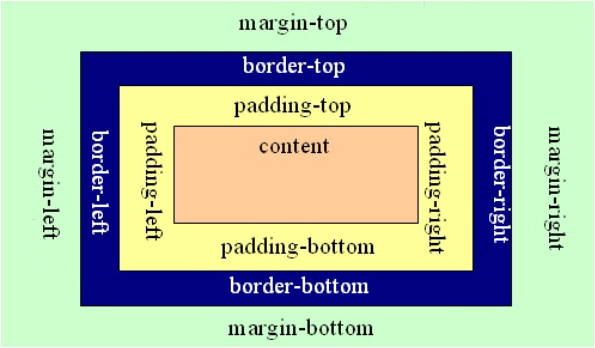
内容(CONTENT)就是盒子里装的东西;
而填充(PADDING)就是怕盒子里装的东西(贵重的)损坏而添加的泡沫或者其它抗震的辅料;
边框(BORDER)就是盒子本身了;至于边界(MARGIN)则说明盒子摆放的时候的不能全部堆在一起,要留一定空隙保持通风,同时也为了方便取出。在网页设计上,内容常指文字、图片等元素,但是也可以是小盒子(DIV嵌套),与现实生活中盒子不同的是,现实生活中的东西一般不能大于盒子,否则盒子会被撑坏的,而CSS盒子具有弹性,里面的东西大过盒子本身最多把它撑大,但它不会损坏的。
填充只有宽度属性,可以理解为生活中盒子每个HTML标记都可看作一个盒子;